your click-and-tune multi-band panadapter
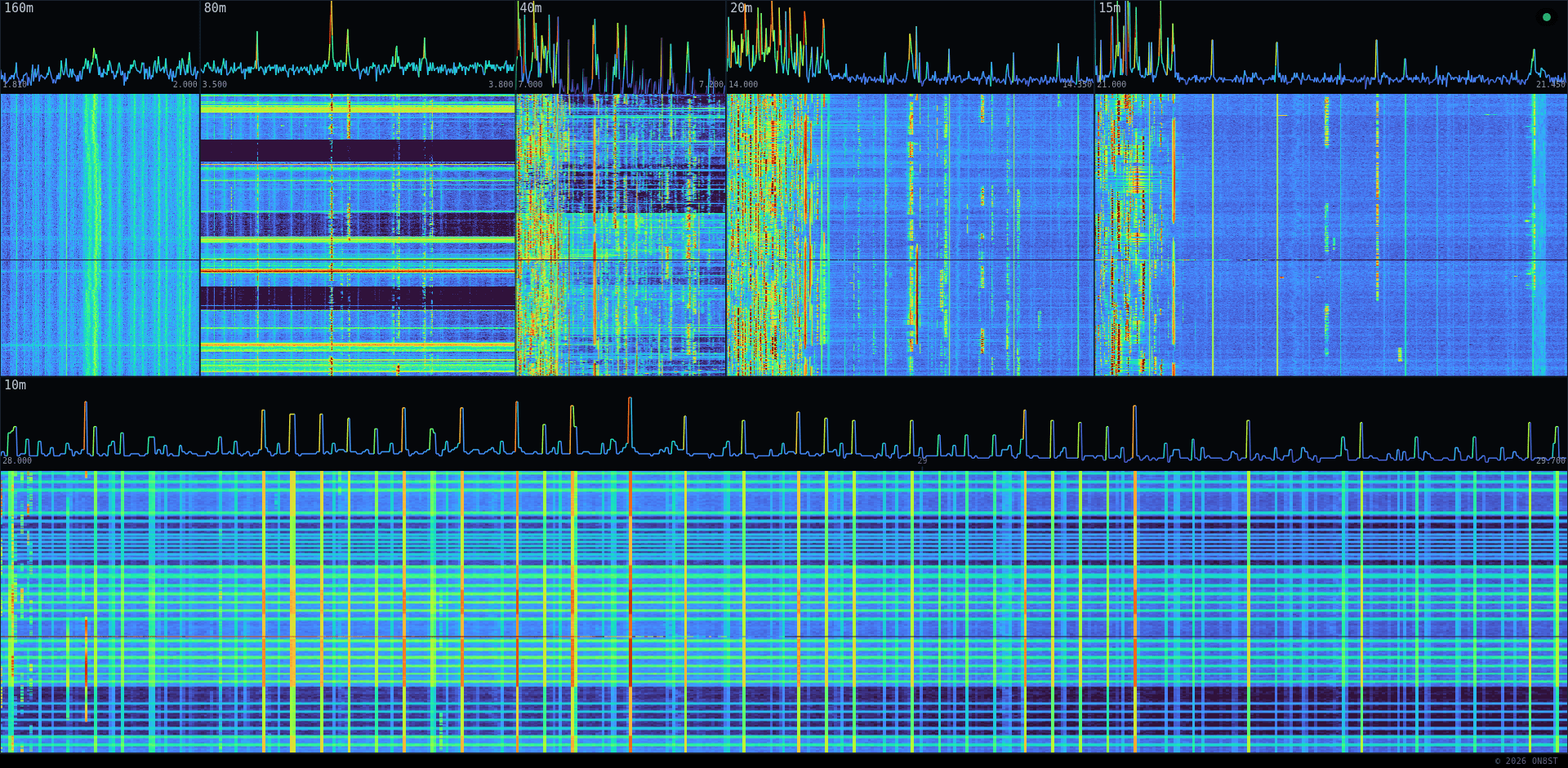
This station runs six SDR endpoints off three independent receive chains (HF/VHF/UHF) sharing one Docker multicast bus. OmniSDR (below) is the multi-band panadapter; the others are single-purpose UIs for the same underlying receivers.
Full station technical documentation — architecture, switching, radio, power, and hardware detail beyond what's on this page — is available at the full documentation page.
| Service | Band | What it is |
|---|---|---|
| UberSDR | HF | Production per-band audio tuner UI. |
| OmniSDR | Multi-band | Click-and-tune spectrum panadapter — this page's subject, see below. |
| UberSDR Multi dev/test | VHF + UHF | Same UI as UberSDR, extended to VHF/UHF. Not production — may be down. |
| HF | HF | Lightweight single-band UI. |
| UHF | UHF (70cm) | Lightweight single-band UI. |
| VHF | VHF (2m) | Lightweight single-band UI. |
OmniSDR drives the companion UberSDR session — click a signal on the spectrum and the UberSDR tab tunes there. The marker follows UberSDR's dial in both directions.
OmniSDR can tune any device on your LAN — UberSDR plus auto-discovered rigctld rigs. Pick the active ones in Right-click → Targets ▸; ticked targets tune in parallel.
Markers: amber = UberSDR · cyan = local rig.
F fullscreen · Esc close · Right-click menu
OmniSDR is reachable on the LAN (192.168.36.38:8086) and via the public Internet (omnisdr.on8st.be through Caddy). The server classifies every WebSocket at handshake time: the real client IP is read from X-Forwarded-For only if the connection itself arrives from the trusted Caddy upstream, so a remote client can't fake a LAN IP. LAN → scopes {shared, local}; public → {shared} only.
Click-and-tune-the-shack is LAN-only. Click-and-tune-UberSDR is for everyone.
Read bottom-up: physical hardware on the floor, apps on top. Every layer consumes from the layer beneath it. Three independent receive chains (HF/VHF/UHF) share one Docker multicast bus.
┌──────────────────────────────────────────────────────────────────────────┐ │ UberSDR host (192.168.36.38) │ │ │ │ ┌────────────────────────────────────────────────────────────────┐ │ │ │ Apps (consume the multicast bus, none talk USB directly) │ │ │ │ • ka9q_ubersdr — HF audio UI (production) │ │ │ │ • omnisdr — multi-band spectrum + tune dispatcher │ │ │ │ • ka9q_ubersdr_dev — VHF+UHF audio UI (dev/test build) │ │ │ │ • ka9q-web-uhf — lightweight single-band UHF UI │ │ │ │ • ka9q-web-vhf — lightweight single-band VHF UI │ │ │ └───────────────────────────────▲────────────────────────────────┘ │ │ │ multicast │ │ ┌───────────────────────────────┴───────────────────────────────┐ │ │ │ sdr-network (Docker bridge — control + I/Q + spectrum) │ │ │ └───────────────────────────────▲───────────────────────────────┘ │ │ │ │ │ ┌───────────────────────────────┴───────────────────────────────┐ │ │ │ radiod instances (each owns one SDR, runs the FFTs) │ │ │ │ • ka9q-radio (HF) — custom fork, feeds off RX888 below │ │ │ │ • radiod-vhf (VHF) — upstream, feeds off RTL-SDR Blog V4 │ │ │ │ • radiod-uhf (UHF) — upstream, feeds off Airspy R2 │ │ │ └───────────────────────────────▲───────────────────────────────┘ │ │ │ ① USB-3 in (host port) │ │ │ data + bus power (HF chain │ │ │ shown below; VHF/UHF SDRs │ │ │ are plain USB, no Y-cable) │ │ ┌───────────────────┴────────────────────┐ │ │ │ Y USB-3 cable — 3-port junction │ │ │ 5 V PSU ────┤ ② USB 5 V in (extra power, no data) │ │ │ └───────────────────▲────────────────────┘ │ │ │ ③ USB-3 + 5 V out │ │ │ data + combined power │ │ ┌───────┴────────┐ │ │ │ RX888 mk2 │ vendor: 5 V / 2 A; │ │ │ wideband HF │ >1 A typical, ~1.5 A peak │ │ │ SDR (USB 3) │ vs USB-3 nominal 900 mA │ │ └────────────────┘ │ └──────────────────────────────────────────────────────────────────────────┘
| Layer | What sits here | Why |
|---|---|---|
| Hardware (HF) | RX888 mk2 on USB 3, attached via a Y USB-3 cable (3-port junction: ① USB-3 in from host, ② USB 5 V in from a wall PSU, ③ USB-3 + combined 5 V out to the RX888) | The wideband HF radio. Single, exclusive to ka9q-radio. The vendor rates the device at 5 V / 2 A (≈10 W); the related Web-888 draws more than 1 A typical with peaks around 1.5 A (Web-888 power guide), and community measurements on the Mk2 USB confirm the same range (NextGenSDRs thread). That's well above the 900 mA a single USB-3 port nominally provides, so the Y cable's port ② injects supplemental 5 V from a separate source on top of the host-port bus power coming in on ①. Current scales with sample rate, which also drives the thermal load (KA7OEI on RX-888 thermals). |
| Hardware (VHF) | RTL-SDR Blog V4 on plain USB 2 — no Y-cable, no supplemental power needed | 2 m receiver, exclusive to radiod-vhf. |
| Hardware (UHF) | Airspy R2 on plain USB 2 — no Y-cable, no supplemental power needed | 70 cm receiver, exclusive to radiod-uhf. |
| Radio backend | ka9q-radio (HF), radiod-vhf, radiod-uhf | Each owns one SDR, runs the FFTs, exposes everything else via multicast. |
| Bus | sdr-network Docker bridge multicast | One pipe for control, I/Q channels, and spectrum. Containers join this bridge to talk to the radios without going through host networking. |
| Apps | ka9q_ubersdr & omnisdr (production); ka9q_ubersdr_dev, ka9q-web-uhf, ka9q-web-vhf (dev/test or lightweight single-band) | All consume from the multicast bus; none talk USB. |
| Browser | UberSDR tab + OmniSDR tab | The operator's two tabs talk to each other via postMessage (the bridge inside the UberSDR page). |
Open omnisdr.on8st.be. Don't open UberSDR yourself — when you click a signal on the OmniSDR spectrum, OmniSDR opens the UberSDR tab for you and tunes it in place. (A separately-opened UberSDR tab won't be picked up: the postMessage bridge only works on the tab OmniSDR launched, since it's the one that holds the window.opener handle.) On the LAN, the Targets menu also exposes any rigctld instance found on the network.
The OmniSDR source lives at on8st/omnisdr on GitHub. The repo is currently private, but I'm happy to flip it public if there's interest — drop me a note (stan@on8st.be / ON8ST) and I'll open it up.